
لا 2. Using a MATLB script, write a code that plots the vector fields 4- xì, 4, and 144. First, p...

![file for upload to Blackboard. ( 20 + 20 pts] clear clc close all hidden % This block of code will create the angle th, the](https://www.subjectmate.com/img/openquestion/285uid1600450058mceclip2.png)
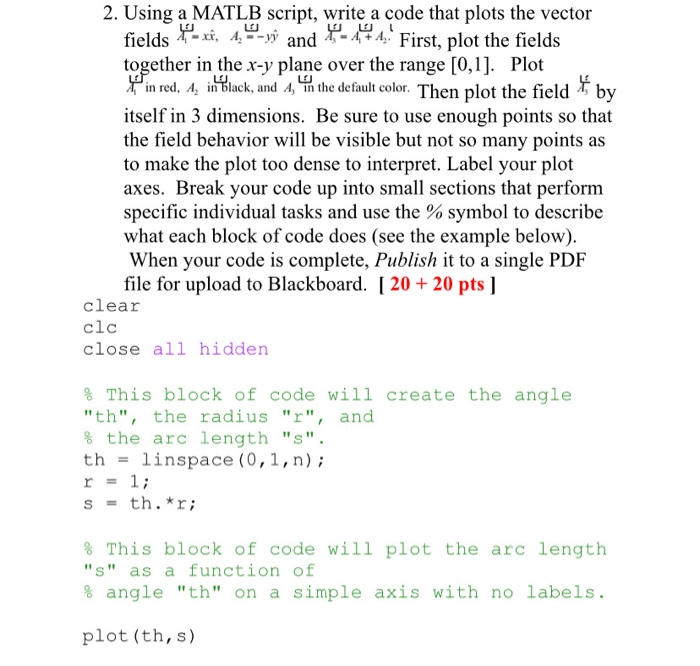
لا 2. Using a MATLB script, write a code that plots the vector fields 4- xì, 4, and 144. First, plot the fields together in the x-y plane over the range [0,1]. Plot in red, A, in Glack, and A, 'in the default color. Then plot the field T by į itself in 3 dimensions. Be sure to use enough points so that the field behavior will be visible but not so many points as to make the plot too dense to interpret. Label your plot axes. Break your code up into small sections that perform specific individual tasks and use the % symbol to describe what each block of code does (see the example below). When your code is complete, Publish it to a single PDF file for upload to Blackboard. [ 20 + 20 pts ] clear clc close all hidden % This block of code will create the angle "th", the radius "r", and % the arc length "S". th = linspace (0,1,n); r = 1; = th.*r; S % This block of code will plot the arc length "S" as a function of % angle "th" on a simple axis with no labels. plot (th, s)
Using a MATLB script, write a code that plots the vector fields 4 – xg, 4, ---vû and 4–474. First, plot the fields together in the x-y plane over the range [0,1]. Plot in red, A, in Vlack, and A, 'in the default color. Then plot the field *, by Ý itself in 3 dimensions. Be sure to use enough points so that the field behavior will be visible but not so many points as to make the plot too dense to interpret. Label your plot axes. Break your code up into small sections that perform specific individual tasks and use the % symbol to describe what each block of code does (see the example below). When your code is complete, Publish it to a single PDF file for upload to Blackboard. ( 20 + 20 pts ]
file for upload to Blackboard. ( 20 + 20 pts] clear clc close all hidden % This block of code will create the angle "th", the radius "r", and % the arc length "S". th linspace (0,1, n) ; r s = th.*r; 1; s % This block of code will plot the arc length "S" as a function of % angle "th" on a simple axis with no labels. plot (th, s)
Solved
COMPUTER SCIENCE
1 Answer
Usamah Taufiq
Login to view answer.